Event Storming and Domain Storytelling
Alberto Brandolini's Event Storming and Stefan Hofer and Henning Schwentner's Domain Storytelling. Two workshop techniques that bring developers and domain experts to a shared model before the first line of code is written.
In this chapter
DDD does not start with code. It starts in a room where the people who write the code sit across from the people who run the domain. Alberto Brandolini's Event Storming (2013) and Stefan Hofer and Henning Schwentner's Domain Storytelling (2016) are two techniques for spending a few hours to a full day in such a room and leaving with something you can open in the IDE tomorrow. Both bring unspoken domain knowledge to the surface, each by a different route. They differ in when they fit and how they are run.
04.01 Why a workshop, why not reading the documentation#
A development team about to start a new project or rewrite an existing one usually responds with “give us a specification and we'll build it.” A usable specification, however, typically does not exist. What exists are three-year-old wiki pages, email threads, an issue tracker with 1,800 tickets, and four people who “know how it works.” None of these sources is authoritative. Each captures the domain from a different angle and at a different time, and they often contradict each other.
That is fine. The domain lives in the heads of domain experts as a knowledge network, and it cannot be read like a book. When the sales director and the head of logistics disagree on what a “shipped order” means, that is a signal: there are two perspectives, and therefore probably two Bounded Contexts. In a workshop, such contradictions show up immediately and get resolved together. A wiki never shows them, because it always captures the view of whoever wrote it.
In Domain-Driven Design (2003), Eric Evans builds Ubiquitous Language on spoken language: the model is refined by the team talking about it out loud, and documents only supplement speech and code. Brandolini, Hofer, and Schwentner add a practical method on top: a concrete notation, a schedule, and roles in the room.
04.02 Event Storming – what it is and what it does#
Event Storming was introduced by the Italian consultant Alberto Brandolini in 2013. Participants stick orange sticky notes with domain events in the past tense on a long wall (or a Miro/Mural board). Gradually they form a timeline of what happens in the domain. As the timeline grows, more colors join: blue for Commands, yellow for Actors, pink for Hot Spots.
The technique grew out of a practical need. In 2012, Brandolini presented it at Italian Agile Day as an event-based modelling workshop, a shortcut instead of drawing a precise UML diagram. It got the name EventStorming only in the summer of 2013, after experiments in Belgium and Poland; the first blog post came out in November of that year. The original purpose was tactical: quickly finding aggregate and context boundaries. Strategic use came later. In the talk 50.000 Orange Stickies Later (2017), the author sums up that path himself: a substitute for a diagram became a learning tool and eventually a platform for collaborative modeling from business to implementation.
Today the technique exists in three formats. The canonical names come from the eventstorming.com website and from Brandolini's company Avanscoperta; for the second and third, the community has settled on the shorter names Process Level and Design Level.
- Big Picture Event Storming – the strategic level. The question: “What actually happens in our domain?” The goal is to discover Bounded Contexts and the main processes. Brandolini plans it as a full-day format for 15–30 people, typically 25–30; 2–4 hours is this book's shortened variant for a smaller domain.
- Process Modelling Event Storming (in the community, Process Level) – the operational level. The question: “How exactly does one chosen process run?” The goal is to describe one Bounded Context in more detail, including Commands, Actors, Policies, and external systems. It introduces a stricter notation grammar but does not enter software design. Duration 4–8 h.
- Software Design Event Storming (in the community, Design Level) – the tactical level. The question: “How does this part of the model translate into classes?” The goal is candidates for aggregates, invariants, and a first API design. Duration 2–6 h, typically for one BC.
In Domain-Driven Design Distilled (Addison-Wesley, 2016, ch. 7), Vaughn Vernon lists Event Storming among the tools that speed up learning and the path to a working domain model. He does not get to it until the last chapter, after aggregates and domain events. It is this book, not Vernon, that puts it at the start of the work.
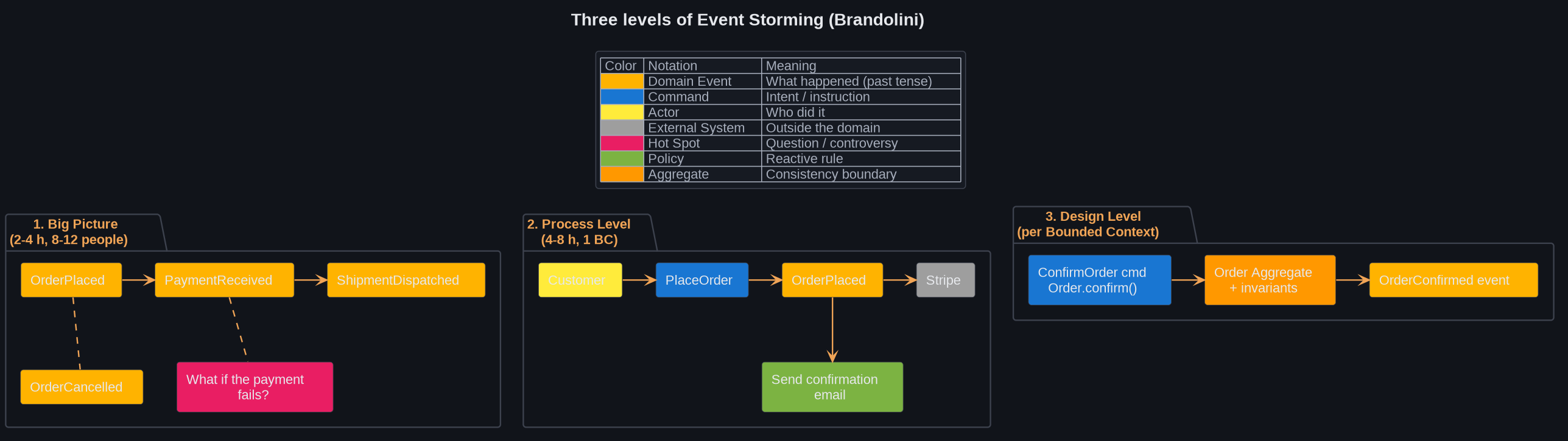
04.03 Notation – colors and shapes#
Brandolini describes the color palette in his book Introducing EventStorming. It has been published on Leanpub incrementally since 2013 and is still not finished: at the time of writing, Leanpub lists 70% of the content and a last update from August 2021. The most complete publicly available legend is therefore maintained by ddd-crew in the EventStorming Glossary & Cheat Sheet. Within one workshop, each color has a single meaning. Whoever starts improvising loses the ability to “read” someone else's map quickly.
| Color and shape | Element | Format | Example | Meaning |
|---|---|---|---|---|
| Orange sticky | Domain Event | all | OrderPlaced |
Something that happened in the domain. Always in the past tense. |
| Blue sticky | Command / Action | Process Modelling and up | PlaceOrder |
An intent that leads to an event. Imperative. With stakeholders, the word Action works better. |
| Small yellow sticky | Actor / Agent | all | Customer, Cashier |
Who initiates the command. A person, a role, a team, or a whole department. |
| Gray sticky (canonically wide pink) | External System | all | Stripe, SendGrid |
A system outside our domain that we communicate with. A shared Excel file belongs here too. |
| Pink, rotated into a diamond | Hot Spot | all | “What if the payment fails?” | A question, a controversy, an unresolved spot. Not discussed right away, only recorded. The rotation is part of the notation. |
| Green sticky | Opportunity | Big Picture | “Refunds could be self-service” | The positive counterpart of a hot spot: a place where you see an opportunity. |
| Small red / green | Value | Big Picture | “−2 days of waiting” | Negative or positive value of a step for the customer. |
| Larger lilac sticky | Policy / Reactive logic | Process Modelling | “When OrderPlaced ⇒ send confirmation” | A reactive rule: “whenever X happens, do Y.” |
| Green sticky | Query Model / Read Model | Process Modelling | “Order detail page” | The projection on which the actor bases the decision to issue a command. |
| Large yellow sticky | Constraint (formerly Aggregate) | Software Design | Order |
A consistency boundary and the rule that must hold inside it. |
| Purple sticky / line | Bounded Context | Big Picture | “Ordering BC” | A boundary between models. Canonically drawn with tape or a line, not stuck on. |
Color conventions differ between facilitators. In his book, Brandolini marks hot spots in purple; the table above uses pink and reserves purple for context boundaries. The legend therefore goes on the wall before the workshop, so the group argues about the domain rather than about what a color means.
Two items in the table need a comment. Green has two different meanings in two formats: Opportunity in Big Picture and Query Model in Process Modelling. The two elements never meet in one workshop, so there is no risk of confusion. The large yellow sticky is called Constraint in the ddd-crew glossary, not Aggregate. The reason is linguistic: the word aggregate means nothing to a domain expert. This book sticks with the term aggregate because the reader needs it for code; on someone else's map, the same element is called Constraint.
For online workshops, Brandolini has two templates of his own on Miroverse, Process Modelling and Software Design. Miro has more community templates, but their colors may not match the legend above. For an offline workshop, the same colors correspond to 3M Post-it packs (the orange is called Vital Orange, the pink Power Pink). A workshop uses up hundreds of sticky notes, so the supply has to be large.
04.04 Big Picture workshop – a step-by-step guide#
Big Picture is the first workshop a team runs with a new domain (likewise when migrating from an existing CRUD system, see the chapter on migration). The goal is not a perfect model but a shared map of what happens in the domain, plus 3–7 identified Bounded Contexts.
04.04.1 Preparation (one week ahead)
Without preparation, the workshop does not work:
- Room and wall. A flat wall 6–8 m long, with no doors or furniture in the way. Brandolini requires Unlimited Modelling Space, a continuous surface the workshop must not run out of. The room also needs a window that opens; a group of twenty people uses up the air sooner than you expect. The online variant needs a 12,000 × 4,000 px frame in Miro or Mural.
- Participants. Primary sources give 15–30 people for Big Picture, typically 25–30; ddd-crew speaks of 10 to 30 or more for a single paper roll. A large group is not something to fix by removing people; at the wall, it breaks up on its own into clusters that work in parallel. There must be at least 2 domain experts (people who actually run the domain, not PMs). On the development side, 3–5 developers including the tech lead, plus one facilitator (see below). A group of around ten is easier to manage, but it is a conscious compromise: some perspectives on the domain are missing from the room.
- Materials. 5–10 pads of orange stickies (3M Post-it, 76×76 mm), 2 pads of pink, 2 of blue, 1 small yellow, 1 large yellow (Constraint), 1 gray, 1 green, 1 lilac (light purple), 1 dark purple. Black Sharpie markers for everyone (no ballpoint pens; their writing is unreadable from 2 m).
- Catering. Coffee, water, fruit, lunch. The workshop is tiring, and without food the energy drops after 90 minutes.
- Invitation. Participants receive a one-page agenda in advance. From it, the domain experts learn that they will not present slides but will “tell a story.”
04.04.2 Workshop procedure (shortened variant, 2–4 hours)
- (10 min) Brief and starting event. In 5 minutes, the facilitator explains the rules: orange = what happened, past tense, stick it anywhere. Then the facilitator kicks off the workshop by writing the first event they know occurs in the domain, such as
OrderPlaced, and sticking it in the middle of the wall. - (20–30 min) Chaotic exploration. Everyone gets about 15 orange stickies and writes the events that come to mind. Stick them anywhere, in no order. The chaos is intentional: people should recall everything, not structure it right away. The facilitator collects notes and pushes people: “and what happens next? and before that?”
- (30 min) Enforcing the timeline. The facilitator starts moving events to the left (earlier) and to the right (later). A timeline emerges. Participants chime in: “no, the refund comes after the warranty claim, move it.” Duplicate events are merged, but only with the participants' agreement.
- (30–45 min) Pivotal Events. The facilitator identifies turning points, events around which a group of others naturally clusters. In an online store, typically:
CustomerRegistered,OrderPlaced,PaymentSucceeded,ShipmentDispatched,OrderClosed. Each is marked with a vertical line across the full height of the wall; the lines divide the timeline into sections. Typically 3–7 pivotal events. - (30–45 min) Hot Spots. Whenever a question comes up during the workshop that nobody can answer right away (“What if the customer pays twice?”), it is not discussed. Instead, write it on a pink sticky and place it exactly where the question arose. After 45 minutes there are usually 8–15 of them. They are the most valuable output of Big Picture.
- (20–30 min) Bounded Context boundaries. The facilitator and the team look for places where the vocabulary changes: where the same term means something else, where one story ends and another begins. Mark them with purple stickies or thick purple lines. Typically 3–7 BCs.
- (15 min) Photos and transcription. A wide-angle photo of the whole wall, then detailed photos section by section. Save everything in
docs/discovery/<date>/in the repo. Online workshop: Miro export as PNG and as a board (link).
04.04.3 How to recognize a context boundary
Step 6 depends on recognizing a boundary when you run into it. On the wall, four heuristics work most reliably:
- Linguistic seams. Same word, different meaning. For sales, an “order” is a cart with discounts; for the warehouse, a list of items to pick; for accounting, the basis for an invoice. Three definitions of one word are a strong hint that there are three contexts on the wall, not one.
- Pivotal events. A turning-point event changes the meaning of an entity. Before
OrderPlaced, an order is an editable draft; after it, a commitment to the customer. An entity whose nature an event changes typically crosses a boundary: it leaves one context and enters another. - Department boundaries. A cheap first estimate. Where the company hands work over (sales → warehouse → accounting), the vocabulary and the rules usually change too. They cannot be adopted blindly, though; an org chart tends to be historical rather than based on the domain.
- Data ownership. The question “who may change this field?” has a single answer within one context. If two teams change a product price according to two different rules, it is not one field with two editors but two concepts in two contexts.
None of the heuristics decides on its own. What you look for are places where several intersect at once. A linguistic seam at a department boundary, where the data owner also changes, is almost certainly a BC boundary. Brandolini examines the link between pivotal events and context boundaries in the essay Discovering Bounded Contexts with EventStorming in the collection Domain-Driven Design: The First 15 Years (Leanpub, 2019). The named relationships between the contexts you find are then described in the Bounded Context and Context Mapping chapter.
04.04.4 What you have at the end of Big Picture
- A timeline with 30–100 domain events.
- 3–7 identified pivotal events.
- 3–7 marked Bounded Contexts.
- 8–15 hot spots as future tickets.
- Photos / Miro export.
What you do not have at the end, and are not supposed to: a complete model, a database schema, a final list of classes. Big Picture is a strategic tool; tactics come later, in Software Design.
04.04.5 Online variant – Miro/Mural setup
How much gets lost online depends on the format. Brandolini laid this out in his text Remote EventStorming (March 2020). Software Design tolerates online best: small scope, 90 minutes, a technical audience. Process Modelling works conditionally: half a day, 5–15 people, the team knows the format from the in-person version, and every third session is in person. On Big Picture he has a single sentence: “Don't even try.” He called his own attempt dysfunctional even with expert participants, because online you lose the parallel conversations at different parts of the wall, body language, and the all-day immersion. He also advises not calling remote sessions EventStorming at all, so the team does not associate the technique's name with a bad experience.
Online Big Picture is still done where domain experts sit in three cities and the alternative is not an offline workshop but no workshop at all. The following procedure is a conscious compromise with a known price:
- A 12,000 × 4,000 px frame. Teams often underestimate the canvas size. A Big Picture with 50+ events needs a lot of horizontal space; otherwise the stickies of different participants start to overlap. In Miro, create a new board and set these dimensions for the first frame in the Frame size parameter.
- A prepared palette. On the left side of the board, place 7–9 source stickies (one of each color) with a frame around them labeled “Copy from here (Ctrl+D duplicates).” Participants copy stickies instead of laboriously opening the sticky picker.
- Voice only, cameras off. Cameras pull attention away from the board; everyone has to look at the same canvas. Exception: the first 5 minutes of introductions and the discussion of hot spots.
- Breakout rooms. In the Pivotal Events phase, split the group into 2–3 breakout rooms of 4 people. Each group works in Miro on one section of the timeline. After 20 minutes, the groups return to the main room and align their results. Without breakouts, an online workshop narrows down to one active participant and five passive observers.
- Breaks every 60 minutes. Online is more tiring than offline. Schedule 10-minute breaks and do not shorten them.
- Asynchronous preparation. Send participants the open Miro board with an introductory text 24 hours in advance and ask them to stick 5–10 events that come to mind before the workshop. The workshop then does not start at an empty wall.
04.04.6 When not to run Big Picture
- A mature product with a settled model. When a team has worked in one domain for three years and has an up-to-date Context Map, a new Big Picture typically reveals nothing new. Process Modelling on a specific painful BC brings more.
- The team is not willing to discuss. Big Picture rests on open debate. If the team is afraid of confrontation or has a strongly hierarchical culture, that barrier has to fall first. Otherwise the workshop produces a false consensus.
- Domain experts are in time zones with no overlap. Big Picture has to happen all at once. When there is no 3–4-hour window in which all the key players are online, the substitute is a series of one-on-one Domain Storytelling sessions with merged outputs.
04.05 Process Modelling – one BC, deeper detail#
After Big Picture, you have 3–7 Bounded Contexts. Process Modelling always takes one BC and condenses it into a structure that translates in Symfony into Command classes, Handlers, and Events on the message bus (covered in detail in the CQRS chapter).
04.05.1 What Process Modelling adds to Big Picture
The events gain blue Commands, the intents that lead to them, and yellow Actors, who trigger them. Lilac stickies carry Policies, reactive rules of the “whenever X, do Y” kind. Gray belongs to External Systems, the third parties. And green Read Models capture the projections the actor uses to make decisions.
04.05.2 Procedure (4–8 hours per BC)
- Open only the events and hot spots from Big Picture that fall into the target BC. Hide the rest (a different frame in Miro, a separate paper wall for this BC).
- For each event, work backward: which command led to it? and who issued that command? The result is an
Actor → Command → Eventsequence. - For each event, work forward: what happens in response? Lilac (light purple) policy stickies. “Whenever
OrderPlaced, send a confirmation email.” - Identify the commands that call external systems or react to them (gray). “After
PaymentRequested, the system calls Stripe and waits forStripePaymentSucceeded.” - For each command, identify which read model the actor needs to see in order to issue it. “The cashier confirms the order when they see the payment went through – the
OrderDetailread model must containpaymentStatus.” - Update the hot spots. Some from Big Picture get resolved at this level; others break down into more detailed ones (e.g., “What if Stripe returns a 500?”).
04.05.3 Example – the Ordering BC of an online store
The sequence for the main scenario:
1Customer (actor)2 → PlaceOrder (command)3 → OrderPlaced (event)4 → "Reserve stock" (policy)5 → ReserveStock (command, another BC: Warehouse)6 → "Send confirmation email" (policy)7 → SendGrid (external system)8 → "Initiate payment" (policy)9 → ChargeCard (command, another BC: Payment)10 → Stripe (external system)11 → PaymentSucceeded (event)The sequence is not code yet; it is a map for the implementation. Even so, it already shows what will be needed:
- An Application Service
PlaceOrderHandlerin the Ordering BC. - A Process Manager that coordinates
OrderPlaced → ReserveStock → ChargeCardacross BC boundaries (covered in detail in the Sagas and Process Managers chapter). - An adapter for Stripe (anti-corruption layer).
- An
OrderDetailViewread model for the UI.
04.05.4 What you have at the end of Process Modelling
- For each BC: a detailed map of commands, events, policies, external systems, and read models.
- A list of Application Service candidates (1 command typically = 1 service / 1 handler).
- A list of saga / Process Manager candidates (every policy that crosses a BC boundary).
- A list of external systems, with a planned ACL for each.
- An updated list of hot spots, both resolved and new.
04.06 Software Design – for each BC separately#
Software Design is the most tactical Event Storming format and the first one that comes close to code. For each Bounded Context, it looks for aggregates, their invariants, and the way commands change an aggregate's state.
04.06.1 What Software Design adds
- Constraints, aggregates in this book (large yellow stickies) – consistency boundaries. Each command has one aggregate that handles it.
- Invariants – rules the aggregate must uphold. They are written as bullet points on the aggregate's sticky.
- Pre-conditions – what must hold for a command to be allowed through.
04.06.2 Procedure (2–6 hours per BC)
- Take the map from the previous level and, for each command, place a large yellow sticky for the aggregate that handles it. The same aggregate for several commands is fine; it only means the class will have more methods.
- Under each aggregate, list its invariants. “Order: cannot be confirmed without at least one item,” “Order: once cancelled, it can no longer be confirmed,” “Order: sum of item.quantity * item.price = total.”
- For each command, mark the pre-conditions: “
ConfirmOrderrequires theOrderto be in theDraftstate and to have at least one item.” - Mark the hot spots you are missing for a complete aggregate specification (“What if an item has a zero price? Is it an intentional gift or a mistake?”).
04.06.3 From the workshop to Symfony
Workshop: Customer → PlaceOrder → Order Aggregate → OrderPlaced
A sketch in Symfony / PHP (a first version, not final code):
1<?php2 3// Application/Command/PlaceOrder.php4namespace App\Ordering\Application\Command;5 6use App\Ordering\Domain\ValueObject\CustomerId;7 8final readonly class PlaceOrder9{10 public function __construct(11 public CustomerId $customerId,12 /** @var list<OrderItemDto> */13 public array $items,14 ) {}15}16 17// Domain/Model/Order.php18namespace App\Ordering\Domain\Model;19 20use App\Ordering\Domain\Event\OrderCancelled;21use App\Ordering\Domain\Event\OrderConfirmed;22use App\Ordering\Domain\Event\OrderPlaced;23use App\Ordering\Domain\Exception\EmptyOrderException;24use App\Ordering\Domain\Exception\InvalidOrderStateTransitionException;25use App\Ordering\Domain\ValueObject\CustomerId;26use App\Ordering\Domain\ValueObject\OrderId;27use App\Ordering\Domain\ValueObject\OrderStatus;28use App\Ordering\Domain\ValueObject\ProductId;29use App\SharedKernel\Domain\AggregateRoot;30use App\SharedKernel\Domain\Money;31 32final class Order extends AggregateRoot33{34 /** @var list<OrderItem> */35 private array $items = [];36 37 private function __construct(38 public readonly OrderId $id,39 public readonly CustomerId $customerId,40 private OrderStatus $status,41 ) {}42 43 public static function place(OrderId $id, CustomerId $customerId): self44 {45 $order = new self($id, $customerId, OrderStatus::Draft);46 $order->record(new OrderPlaced($id, $customerId));47 48 return $order;49 }50 51 public function addItem(ProductId $productId, int $quantity, Money $unitPrice): void52 {53 if ($this->status !== OrderStatus::Draft) {54 throw InvalidOrderStateTransitionException::notAllowedInState(55 'adding an item',56 $this->status->value,57 );58 }59 60 $this->items[] = new OrderItem($productId, $quantity, $unitPrice);61 }62 63 public function confirm(?\DateTimeImmutable $at = null): void64 {65 // Invariant from the workshop: confirm only from the Draft state66 if ($this->status !== OrderStatus::Draft) {67 throw InvalidOrderStateTransitionException::cannotTransition(68 $this->status->value,69 OrderStatus::Confirmed->value,70 );71 }72 73 // Invariant from the workshop: an order must have at least one item74 if ($this->items === []) {75 throw EmptyOrderException::cannotConfirm();76 }77 78 $this->status = OrderStatus::Confirmed;79 $this->record(new OrderConfirmed($this->id, $this->customerId, $at ?? new \DateTimeImmutable()));80 }81 82 // Workshop sketch without the saga lock; for the canonical transition see Aggregate Design.83 public function cancel(string $reason, \DateTimeImmutable $when): void84 {85 // Invariant from the workshop: a shipped or delivered order cannot be cancelled86 if (in_array($this->status, [OrderStatus::Shipped, OrderStatus::Delivered], true)) {87 throw InvalidOrderStateTransitionException::cannotTransition(88 $this->status->value,89 OrderStatus::Cancelled->value,90 );91 }92 93 // A repeated cancellation is not the caller's error; there is nothing left to do.94 if ($this->status === OrderStatus::Cancelled) {95 return;96 }97 98 $this->status = OrderStatus::Cancelled;99 $this->record(new OrderCancelled($this->id, $this->customerId, $reason, $when));100 }101 102 public function totalAmount(): Money103 {104 if ($this->items === []) {105 throw EmptyOrderException::hasNoItems();106 }107 108 $total = Money::zero($this->items[0]->unitPrice->currency);109 110 foreach ($this->items as $item) {111 $total = $total->add($item->unitPrice->multiply($item->quantity));112 }113 114 return $total;115 }116}117 118// Application/Handler/PlaceOrderHandler.php119namespace App\Ordering\Application\Handler;120 121use App\Ordering\Application\Command\PlaceOrder;122use App\Ordering\Domain\Model\Order;123use App\Ordering\Domain\Repository\OrderRepository;124use App\Ordering\Domain\ValueObject\OrderId;125use Symfony\Component\Messenger\Attribute\AsMessageHandler;126 127#[AsMessageHandler(bus: 'command.bus')]128final readonly class PlaceOrderHandler129{130 public function __construct(131 private OrderRepository $orders,132 ) {}133 134 public function __invoke(PlaceOrder $cmd): OrderId135 {136 // Identity is assigned by the application, not the database - see DDD Building Blocks.137 $order = Order::place(OrderId::generate(), $cmd->customerId);138 139 foreach ($cmd->items as $item) {140 $order->addItem($item->productId, $item->quantity, $item->unitPrice);141 }142 143 $this->orders->save($order);144 145 return $order->id;146 }147}Every element from the workshop has a counterpart in code. Command sticky → PlaceOrder. Constraint (aggregate) → the Order class. Invariant from a bullet point → a throw in a domain method. Event sticky → OrderPlaced recorded via record().
The translation is not mechanical, though. Three decisions are made outside the room, and the wall has no color for them:
- When events are published. The example only records them in the aggregate. Synchronous dispatch to
event.businside the command bus transaction is fine; a rollback also reverts the listeners' writes. Whatever leaves the process (a broker, an email, a third-party service) goes through the Outbox Pattern. Sending directly right aftersave()is a dual write, and it breaks at the first exception between the write and the send. - Whether a command returns anything. Here,
__invoke()returns anOrderId. The caller gets that value only throughHandledStamporHandleTrait, and only for synchronously handled messages; on an asynchronous transport, the handler runs in a worker process and the return value never reaches the sender. - Which bus it goes to. Symfony has a single
MessageBusInterface; separate command and event buses are a matter of configuringframework.messenger.busesand aliases, covered in detail in the CQRS chapter.
04.07 Domain Storytelling – an alternative for small teams#
Domain Storytelling was described by Stefan Hofer and Henning Schwentner in a book of the same name (Addison-Wesley, 2021). The technique is older. The authors have used this name since 2016, but its roots go back to the 1990s at the University of Hamburg, where it was called Kooperationsbild and later exemplarische Geschäftsprozessmodellierung. It gathers domain knowledge by a different route than Event Storming: instead of a timeline of events, you draw a story about a domain expert's work in a standardized pictographic notation.
04.07.1 Notation
- Actor – a stick figure. Who does something in the domain. “Customer,” “Cashier,” “Warehouse worker.” It can also be another system or a whole organization. Each actor is drawn only once in a story.
- Work Object – a pictogram of the thing the actor works with. A document (an order), money, an email, a parcel, goods. It is drawn again at every activity, even when it is the same thing, because its state or medium changes during the story.
- Activity – an arrow labeled with a verb and a sequence number. The number belongs to the activity, not to an individual arrow: a step in which an actor hands a work object to another actor is drawn with two arrows but carries one number.
- Annotation – a text bubble with a note: a variant, an optional step, a possible error, a domain term.
- Group – a frame around a set of activities. It delimits a repeated section, a location, an organizational boundary, or a subdomain.
A story sentence has a fixed grammar: who (actor) does what (activity) with what (work object) with whom (another actor). As a practical guideline, one story stays between five and fifteen steps. A longer one is split in two.
04.07.2 Scope – which story are you actually drawing
With a domain story whose scope is not defined, half the room thinks it describes today and the other half thinks it is a design. Hofer and Schwentner therefore classify every story along three axes:
- Granularity. A coarse-grained story gives an overview of the whole process. A fine-grained one breaks a single section down to a level of detail you can program against.
- Time. AS-IS captures how work happens today; TO-BE, how it should happen after the change.
- Domain purity. A pure story describes the domain without software; a digitalized one includes the systems that take part in it. One picture is either one or the other; the two cannot be mixed.
A typical project goes through three stories. A coarse-grained AS-IS pure story gives an overview of the whole process. A fine-grained AS-IS pure story details the painful section. A fine-grained TO-BE digitalized story describes the target state, software included. It pays to write the three axes in the corner of the canvas before the first arrow goes down. Otherwise the group will argue about them halfway through the story.
04.07.3 A concrete example – the order process in an online store
The story “Customer places an order” in Domain Storytelling notation, read in the order of the numbers:
- Customer →(1) browses → Catalog
- Customer →(2) adds product to → Cart
- Customer →(3) submits → Order → Order System
- Order System →(4) requests payment from → Payment Gateway (annotation: “Stripe; async webhook”)
- Payment Gateway →(5) confirms payment to → Order System
- Order System →(6) sends → Confirmation Email → Customer
- Order System →(7) creates → Shipment Order → Warehouse
Seven sentences, seven numbers. Steps 3, 6, and 7 are drawn with two arrows (from the actor to the work object and from the work object to the second actor), but the number belongs to the whole activity. The drawing is intentionally plain: hand-drawn pictograms or the egon.io tool (open source, in the browser).
04.07.4 Domain Storytelling vs. Event Storming – when to choose which
| Criterion | Event Storming | Domain Storytelling |
|---|---|---|
| Group size | 15–30 for Big Picture, 5–15 for Process Modelling | Small: storyteller, listeners, moderator with a modeler |
| Duration | 2–8 h | One shorter session per story |
| Breadth | The whole system / a substantial part | One specific process |
| Depth | Shallow but wide | Deep but narrow |
| Main output | Bounded Contexts + events | A sequence of steps with actors and work objects |
| Facilitator skill | Higher (many people, chaos) | Lower (a linear process) |
| Recommended tool | Wall + Post-its or Miro | egon.io, paper, Miro |
| When to choose | New BC, migration, strategic overview | Deep discussion of one process, small team, limited time |
In their book, Hofer and Schwentner stress that the two techniques complement each other. Event Storming shows which processes exist in the domain (a wide-angle lens); Domain Storytelling uncovers the detail in each of them (a telephoto lens). The authors recommend a combination: Big Picture for the strategic overview, Domain Storytelling for the individual main processes, and Process Modelling with Software Design for the implementation.
04.07.5 egon.io in practice, step by step
egon.io is an open-source web application (Angular on top of diagram-js) that implements the full Domain Storytelling notation. It suits a team that does not want to buy Miro licenses or haul paper around. The procedure for a first session:
- Open egon.io in the browser – no registration required. In the top left there is a toolbar with icons: actor (stick figure), work object (rectangle), activity (arrow).
- Start with an actor. Drag the “person” icon onto the canvas and name it after a role, not a person:
Customer, notJane Smith. The name appears next to every activity in the export, so the choice matters. - Add a work object. The second most common shape – the thing the actor works with. In an online store, typically
Cart,Order,Invoice,ShipmentLabel. - Connect them with an activity. Click the actor and drag to the work object; egon.io creates a numbered arrow. The verb (browses, submits, confirms) goes in the arrow's label.
- Keep it short. One diagram should carry one linear story with 5–15 activities. When you have 30, split it in two.
- Export to SVG. Menu in the top right → Download → SVG. Name the file
<date>-<story-name>.svgand save it indocs/discovery/<date>/storytelling/. SVG is a text format, so git shows the differences and changes are visible in PR review.
Egon.io stores a story in its own text format .egn (alongside the .egn.svg export). The file belongs in the repo next to the SVG. That way the story can be versioned, reopened in egon.io after a change, and re-exported to SVG.
04.08 Workshop anti-patterns#
A workshop without preparation and firm facilitation is worse than none. It creates the appearance of an agreement that does not exist, and the team implements a wrong model based on it. On eventstorming.com, Brandolini keeps a catalog of seventeen named patterns and anti-patterns; where the following anti-patterns overlap with it, the canonical name is given.
04.09 What Event Storming cannot do#
The anti-patterns above are caused by people. The following limits belong to the technique itself, even when it is run correctly.
The happy path crowds out the rest. The timeline is built as a story, and stories are told from the beginning to a successful end. Cancellations, partial refunds, manual interventions by support, and timeouts of external systems make it onto the wall only when someone asks about them deliberately. The defense costs one question, asked at each pivotal event once the timeline is done: “what happens if this fails?”
Non-functional requirements have nowhere to go. Latency, availability, retention periods, GDPR, data volume, operating cost. The notation has no color for them, and the workshop systematically overlooks them. If the architecture depends on them, they belong in a separate session; Event Storming does not replace it.
The map lives only as long as someone maintains it. The wall is a one-day artifact. Without being carried over into the repo and the code, within three months it shrinks to a photo nobody looks at. Section 04.10 is therefore not an administrative appendix to the workshop but the condition for anything to remain after it.
The result depends on the facilitator more than is healthy. The same group working on the same domain produces two different maps with two different facilitators. The technique itself has no correction for this. It is therefore a good idea to reopen the map after a few weeks, ideally with someone who was not at the first workshop.
The last limit is the least visible. A consensus of twenty people, fifteen of whom sit in one department, describes that department's view, not the domain. Hot spots expose this gap only partially: they ask about what the group knows it does not know.
None of this is a reason to skip the workshop. It only means not expecting a finished specification from it.
04.10 After the workshop – what to do with the output#
A workshop without follow-up is a wasted investment. Within 24 hours of its end, four concrete artifacts must go into the repo.
04.10.1 Photos / Miro link
A wide-angle photo of the whole wall, detailed photos section by section, and the Miro PNG export plus the link. Save them in:
1docs/discovery/2026-04-29-big-picture/2├── 00-wide-angle.jpg3├── 01-customer-area.jpg4├── 02-payment-area.jpg5├── 03-shipping-area.jpg6├── 99-miro-export.png7└── README.mdREADME.md contains the date, the participants, the BCs, and a link to the live Miro board.
04.10.2 Updated Context Map
From the purple BC stickies, update the Context Map in docs/context-map.png. If you do not have one yet, create it now. For each BC, check which team owns it and which category (core / supporting / generic) it falls into.
04.10.3 List of domain events
A text file with one event per line serves as a reference for future PRs. A developer adding a new event checks in it whether a similar one already exists.
1# docs/discovery/2026-04-29-big-picture/events.md2 3## Ordering BC4- OrderPlaced5- OrderConfirmed6- OrderCancelled7- OrderItemAdded8- OrderItemRemoved9 10## Payment BC11- PaymentRequested12- PaymentSucceeded13- PaymentFailed14- PaymentRefunded15 16## Shipping BC17- ShipmentCreated18- ShipmentDispatched19- ShipmentDelivered20- ShipmentReturned04.10.4 Hot Spots → tickets
Each hot spot from the workshop = one ticket in the issue tracker, in the “Discovery question” or “Domain question” format, with a link to the photo/Miro. The ticket goes to a domain expert, not a developer – the answer lies in the domain, not in the code.
1Title: [Discovery] What if the payment fails after the shipment is created?2Labels: discovery, ordering-bc3Assignee: @business-expert-name4Description:5Hot spot from the Big Picture workshop 2026-04-29 (photo: docs/discovery/2026-04-29-big-picture/02-payment-area.jpg).6The team is not sure whether the shipment is returned or the customer's account is only marked as unpaid.7We need a clear decision before implementing the Process Manager in the Ordering BC.04.10.5 Recommended repo structure after the first workshop
So that the workshop output does not get buried in Slack, set up this directory structure in the Symfony project right away. Every file has a clear purpose, and nobody has to guess where things belong:
1my-symfony-app/2├── docs/3│ ├── discovery/4│ │ └── 2026-04-29-big-picture/5│ │ ├── 00-wide-angle.jpg6│ │ ├── 01-customer-area.jpg7│ │ ├── 02-payment-area.jpg8│ │ ├── 03-shipping-area.jpg9│ │ ├── 99-miro-export.png10│ │ ├── events.md ← list of domain events (text)11│ │ ├── hot-spots.md ← questions to resolve12│ │ └── README.md ← participants, date, Miro link13│ ├── context-map.png ← updated from the workshop14│ ├── context-map.md ← text description of relationships between BCs15│ └── ubiquitous-language.md ← growing glossary of terms16├── src/17│ ├── Ordering/ ← one BC from the workshop = one namespace18│ ├── Payment/19│ └── Shipping/20└── ...The docs/discovery/ directory is append-only: old workshops are not deleted; only new ones with a new date are added. The team thus keeps a history of how the domain map evolved. A re-storming, a repeated workshop on the same domain (section 04.11), then compares docs/discovery/2026-04-29-big-picture/events.md with docs/discovery/2026-10-15-re-storming/events.md.
The src/Ordering, src/Payment, and src/Shipping directories mirror three of the five purple stickies from the workshop, the Bounded Contexts that got their own code; their internal layering is described in the structure by subdomain. A new developer opening the project sees a structure that matches the photo from the workshop. The link between the artifact in the repo and the artifact from the wall keeps the workshop's language from fading out of the code after six months.
04.10.6 The first PR after the workshop
The first pull request after the workshop should be small and explicitly labeled as a follow-up, not a large commit implementing the first feature. It contains:
- Creation of
docs/discovery/<date>/with all the workshop outputs. - Updates to
docs/context-map.mdanddocs/ubiquitous-language.md. - Empty namespace directories (
src/<BC>/Domain/), each with a shortREADME.md: when it was created, from which workshop, and what it contains. - Tickets for the hot spots (possibly via a script that creates them in bulk).
No domain logic code. The PR has a single job: store the workshop's shared memory in the repo before everyone forgets it. The first aggregate comes in the next PR, which already builds on Software Design.
04.11 Regular re-storming#
The domain evolves. A pivotal event that holds today (OrderPlaced) can lose its meaning within a year if the company moves to subscriptions and SubscriptionRenewed becomes the central event. Without a new workshop, the code and the domain drift apart, and nobody notices right away, because the individual PRs look reasonable.
04.11.1 Recommended frequency
- Regularly: a large Big Picture re-storming for the whole system once every 6 months or once a year. The product's age decides: a startup can re-storm quarterly, a mature product once a year.
- After a major product decision: a new market segment, a new business model, an acquisition. The re-storming takes place before the implementation, not after it.
- When acute problems appear: the team feels the code “doesn't make sense,” or requirements for new features keep getting modeled wrong. Then it is time to bring out the stickies again.
04.11.2 The diff as a refactoring priority
After a re-storming, compare the new map with the old one stored in docs/discovery/<old-date>/. The places where the map changed the most are refactoring candidates: that is where the domain has actually “run ahead” of the code. Where the map changed little, the domain is stable and the code is probably fine.
A re-storming is typically done by a smaller group (3–5 people from the original workshop) and takes less time, because a large part of the map stays the same.
04.12 The bridge from workshop to tests#
Software Design Event Storming leads naturally into test-driven development. Each invariant on an aggregate's sticky is one test case, and so is each hot spot resolved during the workshop. A team that does not start writing tests from the invariants after the workshop loses a large part of the workshop's value.
04.12.1 Turning invariants into PHPUnit tests
The aggregate sticky from the workshop:
1Order Aggregate2- Inv-1: cannot be confirmed without at least one item3- Inv-2: once cancelled, can no longer be confirmed4- Inv-3: sum of item.quantity * item.price = total5- Inv-4: confirm requires the payment to have gone through (hot spot Order-9)A direct translation into tests:
1<?php2 3declare(strict_types=1);4 5namespace App\Tests\Ordering;6 7use App\Ordering\Domain\Exception\EmptyOrderException;8use App\Ordering\Domain\Exception\InvalidOrderStateTransitionException;9use App\Ordering\Domain\Model\Order;10use App\Ordering\Domain\ValueObject\CustomerId;11use App\Ordering\Domain\ValueObject\OrderId;12use App\Ordering\Domain\ValueObject\ProductId;13use App\SharedKernel\Domain\Currency;14use App\SharedKernel\Domain\Money;15use PHPUnit\Framework\Attributes\Test;16use PHPUnit\Framework\TestCase;17 18final class OrderTest extends TestCase19{20 // Inv-1 (workshop 2026-04-29)21 #[Test]22 public function confirm_throws_when_order_has_no_items(): void23 {24 $order = Order::place(OrderId::generate(), CustomerId::generate());25 26 $this->expectException(EmptyOrderException::class);27 $order->confirm();28 }29 30 // Inv-2 (workshop 2026-04-29)31 #[Test]32 public function cannot_confirm_after_cancellation(): void33 {34 $order = $this->orderWithOneItem();35 $order->cancel('customer request', new \DateTimeImmutable());36 37 $this->expectException(InvalidOrderStateTransitionException::class);38 $order->confirm();39 }40 41 // Inv-3 (workshop 2026-04-29)42 #[Test]43 public function total_equals_sum_of_line_subtotals(): void44 {45 $order = Order::place(OrderId::generate(), CustomerId::generate());46 $order->addItem(ProductId::generate(), 2, new Money(100, Currency::CZK));47 $order->addItem(ProductId::generate(), 1, new Money(50, Currency::CZK));48 49 self::assertSame(250, $order->totalAmount()->amountInCents);50 }51 52 private function orderWithOneItem(): Order53 {54 $order = Order::place(OrderId::generate(), CustomerId::generate());55 $order->addItem(ProductId::generate(), 1, new Money(100, Currency::CZK));56 57 return $order;58 }59}The Inv-1 (workshop 2026-04-29) comments are not cosmetic – they point to where the rule came from. When a test fails six months later, a new developer traces the reason for the rule through git blame or by the workshop date.
04.12.2 Domain events as tests
The Command → Event → Policy → Command sequence from Process Modelling translates directly into an acceptance test:
1<?php2 3declare(strict_types=1);4 5namespace App\Tests\Ordering;6 7use App\Ordering\Application\Command\OrderItemDto;8use App\Ordering\Application\Command\PlaceOrder;9use App\Ordering\Domain\Event\OrderPlaced;10use App\Ordering\Domain\ValueObject\CustomerId;11use App\Ordering\Domain\ValueObject\ProductId;12use App\Payment\Application\Command\ChargeCard;13use App\SharedKernel\Domain\Currency;14use App\SharedKernel\Domain\Money;15use PHPUnit\Framework\Attributes\Test;16use Symfony\Bundle\FrameworkBundle\Test\KernelTestCase;17use Symfony\Component\Messenger\MessageBusInterface;18 19final class PlaceOrderHandlerTest extends KernelTestCase20{21 // Workshop scenario "Customer places an order" (2026-04-29)22 #[Test]23 public function place_order_emits_OrderPlaced_and_triggers_payment(): void24 {25 $bus = self::getContainer()->get(MessageBusInterface::class);26 // collectEvents(): a test spy on the bus that records dispatched27 // events and commands; its implementation is omitted here.28 $events = $this->collectEvents();29 30 $bus->dispatch(new PlaceOrder(31 CustomerId::generate(),32 [new OrderItemDto(ProductId::generate(), 1, new Money(100, Currency::CZK))],33 ));34 35 self::assertCount(1, $events->ofType(OrderPlaced::class));36 // Policy from the workshop: OrderPlaced ⇒ ChargeCard37 self::assertCount(1, $events->commands(ChargeCard::class));38 }39}There are two benefits. The tests are readable for domain experts: the naming matches the workshop, so even a non-developer can read a test and confirm it expresses what they meant. And the tests guard against regressions. Whoever accidentally breaks an invariant from the workshop during a refactoring a year from now runs into the test.
The test strategy, domain tests, and integration tests with Symfony Messenger are covered in the Testing DDD chapter.
04.13 Summary#
Event Storming and Domain Storytelling are two proven techniques for getting the domain onto a shared sheet of paper before the first line of code. Both start from the same premise: domain knowledge cannot be read; it has to be discovered in dialogue.
- Event Storming, in three formats (Big Picture / Process Modelling / Software Design), maps the domain in breadth. Big Picture discovers Bounded Contexts and pivotal events. Process Modelling condenses one BC into Command-Event-Policy sequences. Software Design derives aggregates with invariants from them.
- Domain Storytelling goes in depth into one process with a small group. The actor-work object-activity notation can be read without training and fits where Event Storming is “too big.”
- A workshop starts with the domain expert, not with the data model. Events are written in the past tense; aggregates appear only at the end.
- A workshop without follow-up is wasted. Photos, events, hot spots, and the Context Map must go into the repo within 24 hours and into the code within 1–2 sprints.
- Re-storming is a regular activity. The domain evolves, and the map goes stale. Once every 6–12 months, or after every major product decision.
The first Event Storming is typically followed by implementing the first Bounded Context; see the chapters on DDD building blocks, CQRS, Event Sourcing, and sagas. If you are migrating from a legacy CRUD system, continue with the Migrating from CRUD to DDD chapter.
Frequently asked questions
How many people should attend an Event Storming workshop?
Primary sources give 15–30 people for Big Picture, typically 25–30. A large group is not a mistake: at a long enough wall, it breaks up on its own into clusters that work in parallel, and the facilitator keeps pulling them back to the whole. A smaller group of around ten (2–4 domain experts, 3–5 developers, a PM, and a facilitator) is easier to manage, but it is a compromise: some perspectives on the domain are missing from the room. For Process Modelling, Brandolini gives 5–15 people depending on the complexity of the process, and for Software Design 4–8 are enough; both focus on the detail of one BC. A detailed breakdown is in the Big Picture workshop – a step-by-step guide section.
Can Event Storming be done online?
It depends on the format, and the author of the technique has firm views on it. In his text Remote EventStorming (2020), Brandolini considers Software Design online quite feasible, Process Modelling conditionally feasible (half a day, 5–15 people, every third session in person), and about Big Picture he writes, verbatim, “Don't even try.” Online, you lose the parallel conversations at different parts of the wall, body language, and the all-day immersion. When you have no other option, run an online Big Picture as a conscious compromise: breakout rooms for parallel discussions, shorter blocks, and breaks every hour. The procedure is in the Online variant – Miro/Mural setup section.
How should hot spots be handled during the workshop?
The rule is: do not discuss, only record. When a question comes up during the workshop that nobody can answer right away, the facilitator immediately writes it on a pink sticky, places it exactly where the question arose, and the workshop continues. Trying to resolve a hot spot on the spot typically takes 15–30 minutes and usually ends without a result, because the answer lies outside the room. After the workshop, each hot spot becomes a ticket assigned to a domain expert, not a developer.
Who pays for the workshop: product or development?
Ideally both together. The workshop is an investment in a shared Ubiquitous Language that both sides use. When only one side pays, the other does not take it seriously. If only one side can pay, it should be development: without a workshop, it builds a wrong model and spends three sprints refactoring it. That costs many times more than 4 hours of the domain experts' time.
What if the domain experts use colloquial language and slang (“the chronic late payer stiffed us again”)?
Run the workshop in the language the experts use in their real work, slang included. Slang is not corrected; it is the Ubiquitous Language. When an expert says “chronic late payer,” write it on the sticky exactly as they said it. Then model a concept with that name in the code (e.g., ChronicLatePayer); add any synonym used in the team as a PHPDoc comment. Once the language is “tidied up” into formal terms, its meaning gets lost, and a year later nobody knows what the conversation was about again.
If we only have a solo developer and a PM, can Event Storming be done with two people?
No, Event Storming with two people loses its point; it rests on confronting multiple perspectives. Use Domain Storytelling instead, which works with a small group. The PM plays the domain expert, the developer draws the story, and you discuss it step by step. One session gives you usable output for one specific process. Agree on the scope of the story in advance, as described in the Scope – which story are you actually drawing section. When a third team member joins or more domain experts become available, move on to Big Picture Event Storming.
04.14 Further reading#
- Alberto Brandolini – Introducing EventStorming (Leanpub). A book by the author of the technique himself, describing all three formats, with examples and anti-patterns. It has been published incrementally since 2013 and is not finished: at the time of writing, Leanpub lists 70% of the content, a last update from August 2021, and a glossary about two-fifths complete.
- eventstorming.com – the official website of the technique, where Brandolini publishes templates, photos from workshops, and current practices.
- Stefan Hofer & Henning Schwentner – Domain Storytelling: A Collaborative, Visual, and Agile Way to Build Domain-Driven Software (Addison-Wesley, 2021). A comprehensive book on Domain Storytelling with the notation, examples, and integration with DDD.
- egon.io – an open-source web tool for Domain Storytelling. A drag-and-drop editor with SVG export.
- Vaughn Vernon – Domain-Driven Design Distilled (Addison-Wesley, 2016); chapter 7 contains a brief introduction to Event Storming as part of a DDD strategy.
- Eric Evans – Domain-Driven Design: Tackling Complexity in the Heart of Software (Addison-Wesley, 2003). The book DDD is based on; Ubiquitous Language and Bounded Context are the foundation of all the workshop techniques.
- ddd-crew – EventStorming Glossary & Cheat Sheet – the most complete public legend of the notation, formats included, from ddd-crew, licensed under CC BY-SA 4.0.
- Alberto Brandolini – Remote EventStorming – the author's position on online workshops, graded by format.
- Vlad Khononov – Learning Domain-Driven Design (O'Reilly, 2021); chapter 12 summarizes Event Storming in ten steps from the perspective of a practitioner who runs the technique with clients.
- Evelyn van Kelle, Gien Verschatse, Kenny Baas-Schwegler – Collaborative Software Design (Manning, 2024). On the facilitation layer that Event Storming assumes but does not teach: rank in the room, cognitive biases, and dealing with resistance.
- Nick Tune, Jean-Georges Perrin – Architecture Modernization (Manning, 2024) – Big Picture Event Storming as one of four modernization tools, alongside Wardley Mapping and Team Topologies.
- Event Modeling – a sister technique by Adam Dymitruk (2018) with a forward-only timeline and a UI layer. For designing an event-sourced system, it is a closer tool than Software Design Event Storming; see the Event Sourcing chapter.
- Brandolini's official Miro templates on Miroverse: Process Modelling and Software Design.